 Lead Recovery Desk
Find your starting point
Find one useful list. Keep the other records safe.
You do not need to bring every system together before starting. Find where you keep your past customers or enquiries, then check where their contact restrictions are recorded.
Follow the work you already do
Think about the last time you booked a customer, sent a quote or checked an old enquiry. The app or spreadsheet you opened is a useful place to start looking.
Find the customer records
Look in your booking tool, customer system, invoicing app or spreadsheet. You want people who dealt with this business, not a bought list or a collection of website visitors.
Find the “do not contact” records too
If you previously used an email platform, it may hold unsubscribes that your customer spreadsheet does not. Keep those records and compare them before considering follow ups. Starting with one file does not mean ignoring restrictions elsewhere.
Choose the matching guide below
You export a file yourself. No CRM or address-book connection is required. If several sources disagree about a contact, keep the restriction and ask for help before sending.
An example business with three sources
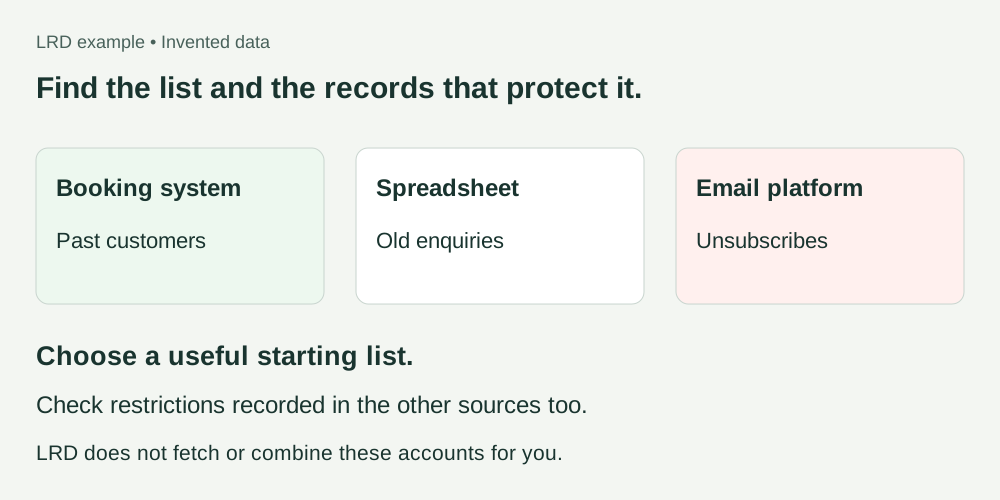
Where did you find it?
If you still cannot find a usable list
I have invoices, paper notes or PDFs
Check whether the system that created them has a customer CSV export. LRD cannot read a photograph or PDF as a contact list. Do not upload documents containing private notes or payment details.
Someone else manages the system
Ask them which app holds customer records and whether they can export the relevant contacts and restrictions as CSV. You do not need their password.
I only have names, with no email addresses
LRD’s follow ups use email. A name-only list does not provide a way to email someone. Check your own business records; do not guess addresses or buy extra contact details.
I want to see the process before using my list
Try the small example CSV. Its contacts are invented, and previewing it sends nothing. It counts towards your account’s free preview allowance.
For help, tell us the app name, roughly how many rows there are and the column headings. Do not send customer rows or passwords.